Applications

Rapid Prototyping

Describe what you need in plain language. Claude Code or Codex writes the model into confBuild Sheets as parameter rows, so the first version is already editable and every variant is a changed value instead of a new drawing.

Claude Code · Codex › Pick-and-place gantry travel X 800, Y 500 Z stroke 150 mm gripper: suction cup Sheet · Parameters PARAMETER MM Table height900 Travel X 800 1000 1200 Travel Y500 Stroke Z150 X 800 X 1000 X 1200 Editable 3D model in the browser Variants A X 800 B X 1000 C X 1200 STEP · 3MF · PDF Export
A concrete example

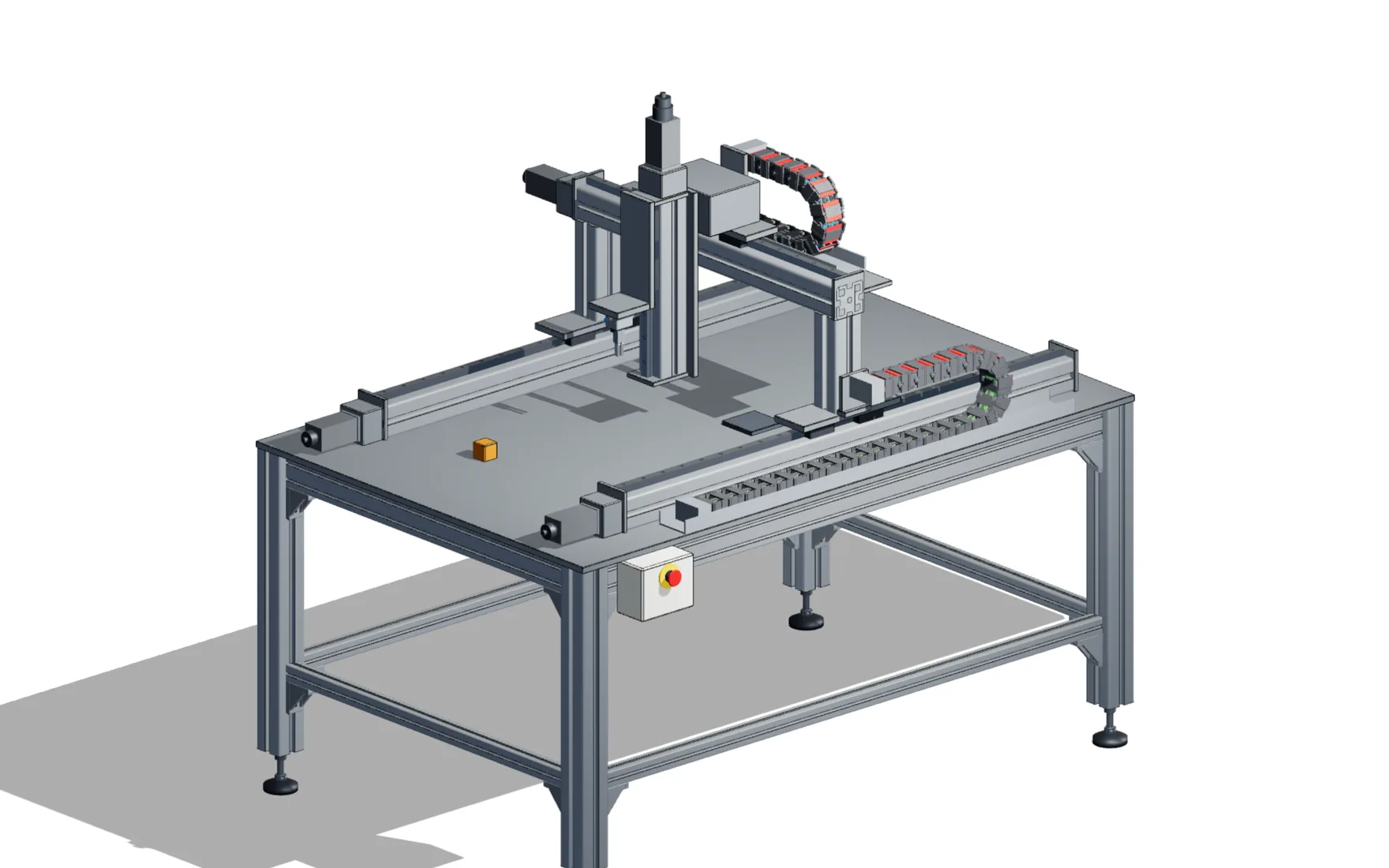
Pick-and-place gantry on a T-slot frame

This public example project was built through the confBuild MCP server. It shows what a first prototype loop delivers and what remains for detailed engineering.

1. The request (simplified)

“Pick-and-place gantry on an aluminium table frame. Travel X 800 mm, Y 500 mm, Z stroke 150 mm. Parallel gripper or suction cup, energy chains on X and Y, an operator box with emergency stop.”

Before writing anything, the AI client plans the structure: table frame, X axes, Y bridge, Z axis, gripper and control cabinet each get their own Sheet.

2. The model in Sheets

Every part is a row with type, dimensions, position and material. The main values are inputs that the child Sheets reference:

  • Travel X, travel Y and Z stroke
  • Table height
  • Gripper: parallel gripper or bellows suction cup
  • Energy chains on X/Y, levelling feet or anchored base plates

Change one input and every row that references it follows.

3. Review in the browser

The project script runs a pick-and-place cycle with a workpiece, an exploded view and a 13-step assembly guide with camera moves. After each revision the AI client inspects the model in four views – in context, isolated, as a section and as x-ray – and repairs what does not fit.

Reviewers open a link. Nobody needs a CAD licence.

4. What you can take further

Posts, rails, worktop, axis bodies and plates are individual manufactured parts. Guides, motors, grippers, chains and the cabinet are marked as purchased parts.

  • Bill of materials and cut list
  • STEP of the assembly or of single parts
  • Drawings and assembly plan as PDF

It remains a concept model: sizing of drives and guides, tolerances and the risk assessment are still engineering work.

Try the example yourself

Change travel, stroke, table height and gripper type, then start the pick-and-place cycle or the assembly guide.

Pick-and-place linear gantry on an aluminium T-slot table frame, created in confBuild
Rapid Prototyping

Why the first model should already be editable

Early concepts change every day: a travel gets longer, the motor moves to the other side, the customer wants a second station. If the first model is a quick sketch or a mesh from an image generator, each change means starting over. In confBuild the AI client does not produce opaque geometry. It writes rows into Sheets – with formulas, references and named parameters – that you can read and change yourself.

Readable Each part is one row: type, dimensions, position, material. You can see exactly what was built and correct a single value.
Parametric from the start Main dimensions are inputs. The Sheets for frame, axes or housing reference them, so one change propagates through the model.
Checkable Before saving, references, Sheet structure and parameter wiring are validated. Every saved revision can be restored.
From prompt to a variant you can show

Run the whole loop from Claude Code or Codex, or switch to the browser editor at any step. Both work on the same project.

  1. 01
    Describe goal and limits

    Main dimensions, required assemblies, the values you want to vary and what counts as done, for example “no floating parts, plausible scale”.

  2. 02
    Let the AI build the Sheets

    Through the confBuild MCP server the client plans the Sheet structure, writes the rows, validates them and saves a revision in your account.

  3. 03
    Check and correct

    Look at the model in the browser, change values in the Sheet or the control panel, or give the AI client the next instruction.

  4. 04
    Compare and hand over

    Save variants, send a review link and export STEP, 3MF or drawings once the concept is agreed.

Rapid Prototyping

What helps in the first concept phase

No separate prototyping tool: these are the same functions you later use for configurators, drawings and quotes.

01

Modelling with Claude Code and Codex

The hosted confBuild MCP server lets your AI client create, read and change projects. The AI reasoning runs in your client; the projects stay in your confBuild account.

  • Start new projects or continue existing ones by link
  • Profiles for machines, buildings, 3D printing, structures and furniture
  • Rendered views to check every revision
02

Standard parts instead of placeholders

Fasteners, bearings, linear guides, aluminium profiles, pneumatic components and drive elements are available as native rows with dimensions from the standard tables.

  • Purchased parts are marked in the BOM
  • Connection points for cables and hoses
  • No manual modelling of screws and nuts
03

Motion and assembly sequence

Project scripts move axes, doors and grippers, create exploded views and step-by-step assembly guides. Useful when a concept has to be explained, not just shown.

  • Animated machine cycles
  • Exploded views
  • Assembly guide with camera moves
04

Export when the concept settles

STEP with exact B-rep solids for your CAD system, 3MF and STL for printing, glTF for the web, plus drawings and bills of materials from the same model.

  • STEP of single parts or the assembly
  • 3MF and STL for 3D printing
  • BOM as CSV, drawings as PDF
Outputs

What you have after the first loop

A concept model, not a released design – but one that later stages can build on instead of redrawing it.

Editable model Sheets with named parameters and the complete part structure.
Variants Saved configurations that you can compare and load again.
Review link A browser link for colleagues and customers, including prepared animations.
Exports STEP, 3MF/STL, glTF, bill of materials and drawings when you need them.
Typical uses

Where this saves the most time

  • Fixtures, gantries, frames and enclosures for next week's customer meeting
  • Feasibility checks before an engineering budget is approved
  • Printed functional prototypes that are needed in several sizes

Try it with your own part

Connect Claude Code or Codex to confBuild and describe the next fixture, frame or enclosure you need.